The Ultimate Guide: How to Automate Your Freelancer Onboarding Process
The Ultimate Guide: How to Automate Your Freelancer Onboarding Process
Think about the situation when, after days of fruitless hunting, you have found the perfect freelance full-stack developer or a talented senior graphic designer.
They have all the skill sets you need for your project, and they agree to start working for you immediately. But they are not coding, they are not even looking into the code base, they are not even in Figma — they are in a kind of administrative limbo.
They get caught up in a cycle of email correspondence. You are asking them to sign the NDA provided by your legal team, you are not sure whether you should ask them for a W-9 or W-8BEN form, and they are asking to provide them with access to your Slack, Jira, and GitHub repository for the third time in a week.
If this is the case, there is a serious problem with your business processes. Manual Onboarding can create moral problems with your best candidates, reduce speed to productivity, waste your resources, and cause legal and compliance liability potentially worth thousands of dollars in fines.
Today’s labor force includes a significant proportion of contingent workers, freelancers, and contractors, and the solution to this problem would be automation of the freelancer onboarding process.
To have a successful freelancer onboarding process, one should not just focus on collecting the documents and giving access to the systems. It entails making agreements legally, organizing tax documents, setting up payments, information security, and project details. Companies that handle all these procedures in a strategic manner will have a smoother process.
Automate your document management process, and there will be no more problems growing your agile team. In this ultimate guide for freelancer onboarding, we are going to tell you about automation of the freelancer onboarding process, its potential ROI that your business could get from it, what should be done before starting the process, and how to implement it step-by-step with modern software like Gigmint.AI.
What is Freelancer Onboarding Automation?
Onboarding Automation for Freelancers implies the process of automation of the whole process of onboarding from the first communication till the delivery of the project using the methods of software, digital triggers, and process integration ensuring that there will be no human interference required during each step of the process.
It is not necessary to write emails to the IT Department asking for software licensing or creating contracts that suit the specific freelancer, as all of this would be taken care of automatically when the freelancer is hired, such as the creation of MSAs from dynamic data, local tax data collection, software provisioning, and project briefings.
Employee Onboarding vs. Freelancer Onboarding: A Critical Distinction
One of the common mistakes made by many organizations is that of trying to incorporate the processes of onboarding their full-time employees to freelancers and independent contractors.
The freelancer onboarding process of the employees involves the retention of the new employee and the integration of the new recruit into the organization. Onboarding involves paying a lot of attention to the corporate culture, enrollment in benefits, 401(k), compliance training, and step-by-step integration for 30, 60, and 90 days after hiring. It is a gradual process of relationship building.
An entirely different approach needs to be used when freelancer onboarding and independent contractors. Freelancers and independent contractors are hired specifically because of their expertise and the ability to get the task done within the required time limit.
The company’s dental plan may not be of any use to them, and they do not need to go through the three-day-long cultural orientation using Zoom. All that the freelancer needs is the access to all the details about the project.
All these things are well understood by the automated Freelancer Management System (FMS).
Why Automate Your Freelancer Onboarding Process? (The Hidden ROI)
Automation of the onboarding process for freelancers is not a nice-to-have that will make the lives of your HR & Operations teams easier – this is a strategic decision that will pay off in dollars and cents. This is what you could get through automated workflows for freelancers.
1. Reduction of Time to Productivity (TTP)
Time to productivity is one of the metrics that indicate the period of time between accepting the offer by the talent and producing the first deliverable. With the conventional manual process, the time required for processing TTP could range from several days to several weeks.
The factor influencing the TTP could vary from time zones to the loss of emails to the bureaucracies related to getting signed approvals from the department heads for accessing the documents.
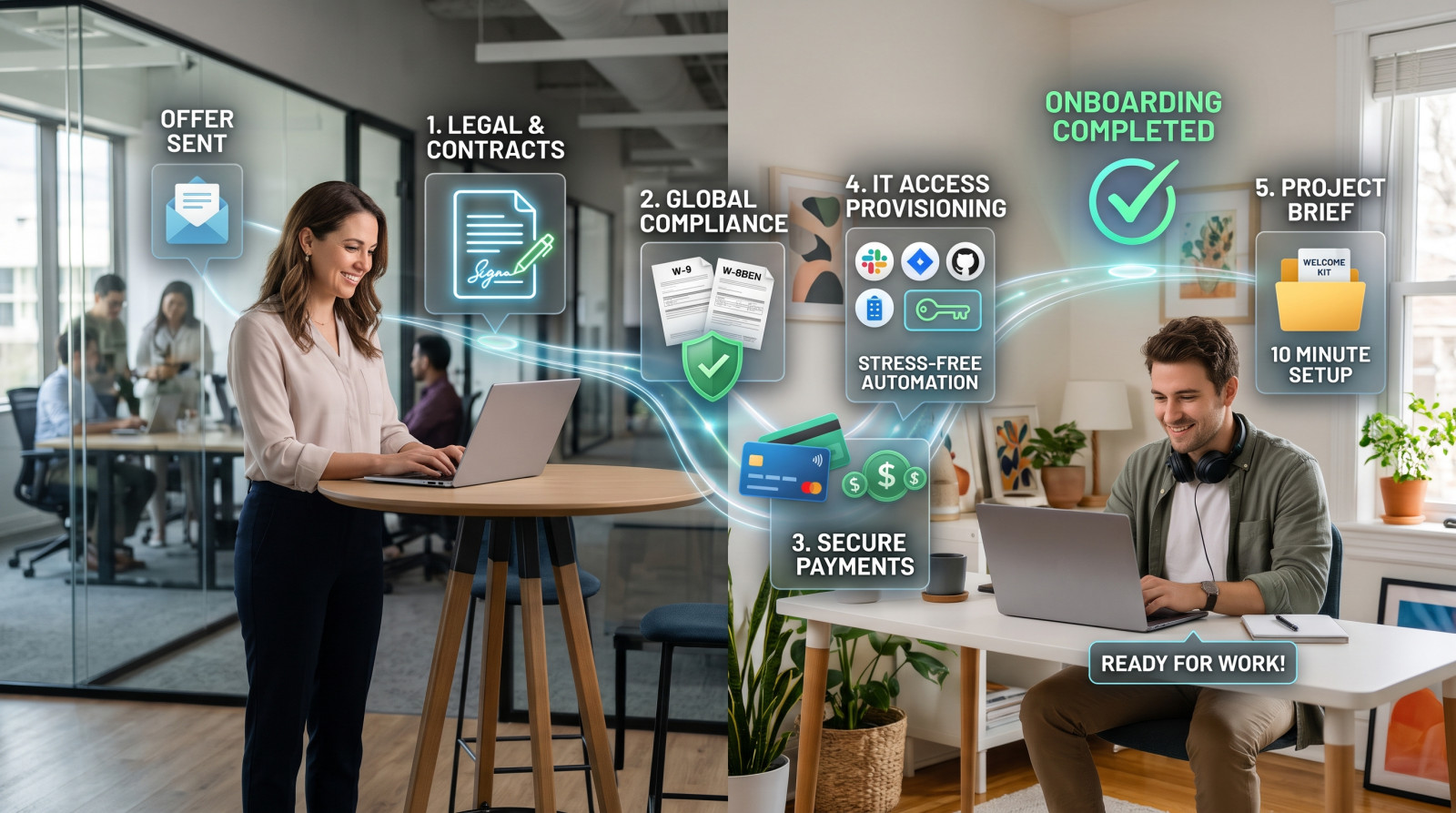
With automation of the workflow, the TTP will be substantially reduced. Accepting the offer, getting the signed document, uploading the compliance documentation, sending the project brief – everything could be done during a 10-minute session with the freelancer. Put differently, your projects would be launched faster and time-to-market would decrease without having to pay any retainers or hourly charges for idle time.
2. Bulletproof Global Compliance & Security
Employee misclassification and lack of adequate documentation are two major threats related to the use of the contingent workforce. In the USA, the IRS offers guidelines on classifying workers, while in California, the law AB5 outlines the necessary requirements for identifying an independent contractor. The UK’s IR35 regulations govern the tax status of such employment relations.
The automation of the process makes the key risk factor in terms of compliance vanish. Proper freelancer onboarding process guarantees that the freelance worker will not be able to advance to the next level, will have no access to company information and will not receive compensation until the signing of the needed documents.
Using automation makes the non-disclosure agreement and IP transfer agreement safe for the employer before the worker gets access to the line of proprietary code or company’s marketing strategy.
3. Power Freelance Success with Managing Your Projects and Time
It has never been so necessary to have the best freelance professionals working for you. Your best software developers, technical writers, and user experience (UX) designers are introduced to the best clients. It can be the first time that they can sense the way of working with your company every day.
An unprofessional freelancer onboarding process might tell your best professionals how hard it will be to be paid by your company, how complicated and unprofessional it is. The best professionals will get away from you and work on other clients’ projects even before yours. A well-organized self-serve portal will show your company in a highly professional and technologically progressive light.
4. Massive Administrative Cost Reduction
So let us now calculate the salary of your HR managers, lawyers, and IT managers per hour taking into account all the overheads associated.
So now let us multiply the cost per hour by the two to four hours which will be required in creating a customized contract, manual verification of the bank routing number, exchanging emails regarding the tax status of the employees, and finally the creation of the accounts of each of your freelancers.
With the recruitment of fifty to hundred freelancers in a year, it is inevitable that there will be huge amounts of wastage of time and money.
All these redundant processes can become outdated through the use of FMS. Your core team can divert their attention to more productive activities like coming out with new strategies.
5 Core Pillars of an Automated Freelancer Onboarding Workflow
The automation process for any process requires automation of the whole process, not one part of it. Any efficient automation solution for the onboarding process of freelance workers needs to cover the following five pillars:
1. Legal & Contracts (Foundation)
It is essential that there is always a set of legal barriers for every freelance assignment. When automating the process, your solution must be capable of producing dynamic contracts.
What it means is that it will take into account all the variables related to the freelancer, such as legal name, kind of entity (LLC or sole proprietorship), his/her hourly rates, and the scope of the assignment, and then will fill those variables into an approved contract template.
2. Tax & Global Compliance (The Shield)
The requirement for filing taxes will depend on the freelance worker’s jurisdiction, the jurisdiction of the company that hires the freelance worker, and the activities that the freelance worker carries out.
Where a freelance worker is in the US, the business usually requests Form W-9 to obtain the taxpayer identification details. In case the freelance worker is from abroad, Form W-8BEN could apply, while Form W-8BEN-E would apply where the entity is foreign.
3. Finances Setup and Routing (The Engine)
Of course, the freelancer's primary concern is getting paid on time and in full. Hence, it is important that onboarding is accompanied by a secure gateway where the invoicing information and bank details will be gathered. It includes routing number, account number, SWIFT/BIC code, etc. An effective system will also be capable of gathering information on the preferred currency and linking it with AP system/e-wallet so that when the invoice is accepted, the payment is routed automatically.
4. IT & Access Provisioning (The Gateway)
The freelancer onboarding process within the IT department is one of the major issues that everyone hates. Automation through webhooks, API integration, and SCIM (System for Cross-Domain Identity Management) enables you to provide role-based access to all the necessary applications.
No matter what, be it guest access to Google Workspace, adding him/her to the proper GitHub repository or inviting them to the respective Jira project and Slack channel – all those things need to be automated just right after the signing of the contract.
5. Project Briefing & Context Enablement (The Launchpad)
After successfully getting over all these legal and technical challenges, the contractor will need to get some context in order to do his/her job. In order to give this context, you will need to send them a welcome kit and, of course, you have to automate this process.
This welcome kit will totally depend upon the role the person is playing in your project and will include links to the brand guidelines, scope of work (SOW), timeline, meetings, and many more.
How to Automate Your Freelancer Onboarding Process
Since now we know the importance of scaling and nitty-gritty details regarding the scaling scope, we can start developing a comprehensive plan on how to scale a freelance team.
Step 1: Perform an audit and visualize your process
That’s where it all begins – you won’t be able to fix anything if you don’t understand what’s going on right now. Invite the representatives of HR, Operations, Legal and IT departments and map your current process on the whiteboard.
-
How many days does it take to transition from the verbal offer to the actual first working day?
-
How many emails should be sent to sign a single contract?
-
How frequently do you need to remind your freelancer about the template or bank details?
-
Where are the "black holes" where your freelancer stops responding?
Consideration in Practice: If you audit your current process of onboarding, try not to concentrate only on the duration of each step. Examine the communication breakdown, errors made in completing some forms, delays in processing access requests, and the amount of manual follow-up required. All this information will help you understand what tasks need to be automated first of all.
Step 2: Centralize Operations with a Freelancer Management System (FMS)
The biggest mistake a business can make concerning the architecture is the attempt to automate everything via connecting various point solutions via duct tape.
Although it is possible to connect Google Forms with Zapier, and from there with DocuSign and Google sheet and then with Slack, it forms a rather complex solution, which means that one mistake in the API will destroy the whole freelancer onboarding process and will take days for IT specialists to resolve it.
Instead, it is much simpler to use some specialist platforms, such as Freelancer Management System, e.g., Gigmint.AI. It allows you to unite all the processes that are connected with your work in one single system – from contract generation to compliance and identity verification, project management, and global payments.
Step 3: Create Modular, Dynamic Document Templates
Coordinate with your legal department and make modular and standardized contracts by disassembling your rigid contracts. After uploading these contracts in your FMS, you will be categorizing these contracts in the format of {{Freelancer_Legal_Name}}, {{Hourly_Rate}}, {{Project_Deliverable}}, {{End_Date}}.
All a hiring manager needs to do for triggering the freelancer onboarding process is fill up a simple form internally. You get a custom-made contract without the need for MS Word and the possibility of inserting the wrong name of the freelancer into the new contract.
Step 4: Design a Secure, Self-Serve Freelancer Portal
It is preferable for your independent contractors to manage their own data entry. Rather than sending them sensitive information via email, such as tax IDs, passports, you can suggest to use a secured branded self-service portal where they will be able to:
-
Review, comment (if necessary), and electronically sign all agreements.
-
Upload their portfolio, certificates, government ID.
-
Safely input their bank information and receive automatic validation.
-
Fill out dynamic tax questionnaires where necessary, which would then fill out the corresponding tax forms automatically depending on the information submitted.
Where organizations have a mandate of collecting sensitive data about independent contractors, it is equally important to consider the data protection responsibilities that may arise in the course of the activity. Some of the strategies include controlling access, securing storage of data, setting permission levels, and managing data retention.
Step 5: Configure Trigger-Based Workflows and Automation Logic
It is at this stage when the power of automation of the onboarding of freelance employees becomes evident. “If/Then” triggers will be used to automate the process of data transfer, communication, and software access.
Trigger 1: Freelance employee agrees to receive the email invite to the portal.
Action 1: Process of signing NDA begins.
Trigger 2: NDA is signed and countersigned.
Action 2: Access to the Master Service Agreement and Tax Document questionnaires is granted.
Trigger 3: Legal and tax documents are signed.
Action 3: IT API requests creation of a guest account in the Slack app.
Step 6: Automate the Offboarding (The Critical Missing Link)
Without automated offboarding, there can be no seamless freelancer management process. Whenever there is an end to the freelancing contract of employment, failure to remove access to the company systems means it is a threat to security as well as intellectual property theft.
Sunset triggers should be available in the automation system. This will enable you to kick start your automation process after the end of the contract date elapses. Whenever the expiration date of the contract is December 31st, the offboarding process commences through emails, slack channels, and other platforms.
Common Freelancer Onboarding Mistakes and How to Avoid Them
While automation is very efficient, there are quite a few pitfalls that you should not fall into while implementing this technique to make your business processes more effective.
1. The Risk of Lacking the “Human” Component in an Automated Process
An automated process does not imply that it will not be nice. Transactional onboarding may lead to making the freelancers feel that they are unwanted and out of tune with the company’s goals.
The Solution: Add some warmth to your emails by adding a video message of the company’s CEO or department head that will automatically be sent. It would also be helpful to create an automatic reminder for the project manager to personally welcome the new hire on his/her first day at work.
2. Overcomplicating the Tech Stack and Creating Data Silos
As has been already mentioned above, constructing a complex network of software integrations (Zapier + HelloSign + Typeform + Google Sheets + QuickBooks) leads to nothing but disaster. You lose access to a unified database, have limited visibility into errors, and may end up paying for a dozen software applications.
The Fix: Use a universal platform. Services like Gigmint.AI have been designed specifically to take the place of this fragmented and costly solution by offering the unified platform where sourcing is smoothly followed by onboarding, which, in turn, is smoothly switched to project management, triggering the payment process.
3. Ignoring Local Labor and Compliance Regulations
Using one and the same contract, common in the US, for the software developer from Germany, the designer from Brazil and the writer from Canada is highly dangerous. The definition of the term 'independent contractor' vs. 'Employee' differs significantly from country to country (and even state to state in the case of the US).
The Fix: Your automation system must be able to adjust to local labor and compliance laws. The Freelance Management System must adjust the necessary legal clauses, terms of IP agreement and other paperwork according to the nationality of the freelancer.
4. Poor Mobile Experience
Many of today’s freelancers handle administrative work from their smartphone or tablet devices while on-the-go. If your freelancer onboarding process requires them to log in from their desk using a desktop computer and complete cumbersome PDF forms, you’re introducing additional friction.
The Fix: It’s important that the automation software or FMS system you use has a responsive design for mobile users.
Best Tools to Automate Your Freelancer Onboarding Process
In regard to implementing the automation process, the choice of software tools will be the determining factor that will make or break this process and ensure your success and security. In general, there are two ways how companies approach this problem:
1. The “Piecemeal” Approach (“DIY Way”)
It requires assembling various different tools. So, you may use DocuSign or PandaDoc for digital signatures, Typeform for information gathering, Zapier/Make.com for API connections between applications, Airtable for database management, and BILL for payments.
Strengths: Great customization power if you have an internal ops and engineering team.
Weaknesses: High IT maintenance, lots of troubleshooting when APIs change, high costs due to multiple enterprise licenses purchased, data fragmentation.
2. The FMS Approach (The Enterprise Method)
Using a dedicated Freelancer Management System that incorporates the whole lifecycle within one platform.
For contemporary companies that are looking to grow and scale up without having a huge number of administrators, a combined FMS solution is the benchmark. Gigmint.AI is one such premier AI-powered system to automate the independent contractor freelancer onboarding process.
The system offers an end-to-end platform to enable you to:
-
Hire qualified people.
-
Automate your onboarding using triggers.
-
Be compliant with all international regulations through localized contracts.
-
Handle your projects and project milestones.
-
Process payments in various currencies without any hassles.
This is because when the entire lifecycle is integrated into one single platform, Gigmint.AI provides you with an extremely premium experience for both your internal managers and your freelancers.
Future-Proof Your Freelance Workforce Today
It is clear that the gig economy is not some passing trend; it is one of the key elements of the modern business strategy.
Since your company is increasingly dependent on independent contractors to stay nimble, hire top-notch talent worldwide, and beat the competition, you cannot continue wasting your time on long, boring, and old-fashioned approaches to the whole process any longer.
With the automation of the freelancer onboarding process, you will be able to start projects faster, ensure compliance with all the rules, get rid of excessive bureaucracy, and give the best possible experience to your talent.
Do not waste your valuable time looking for signatures in emails and filling out tax forms manually. It is time to automate.
Sign up for the demo or a free trial at Gigmint.AI right away and discover just how easy and beneficial the hiring process of freelancers can be!
Frequently Asked Questions (FAQs)
How long does the onboarding of freelancers take?
The traditional manual process of onboarding the contractor can take from a few days to even weeks, which would create a delay in the project. Through automated freelancer onboarding, the whole process of onboarding right from dynamic contract generation, tax collection, and software access could be completed in less than 15 minutes.
What is the difference between FMS and HRIS?
Human Resource Information System, commonly known as HRIS, including Workday and BambooHR, is made for full-time employees. Payroll taxes, health benefits, performance appraisals, and employee retention are the concerns of this system. Freelancer Management System, also known as FMS, such as Gigmint.AI, is built for independent contractors.
Is there any way the automation of freelancer onboarding can help you be compliant with the IRS?
Of course. This is one of the advantages. During the freelancer onboarding process, US freelancers will ensure you receive a valid and verified W-9 form, while international freelancers will send you a correct W-8BEN form before starting work for you. The likelihood of paying hefty fines from the IRS, going through an audit, and facing worker misclassification decreases drastically.
Is it complicated to connect the FMS with the rest of the software you use?
Not really. Most current solutions, such as Gigmint.AI, have API and integration tools that enable them to easily interact with the rest of your accounting software (QuickBooks, Xero), communication software (Slack, Microsoft Teams) and project management software (Jira, Asana, Trello).