Web Development Mistakes That Hurt Website Performance: A Comprehensive Guide to Optimization
Web Development Mistakes That Hurt Website Performance: A Comprehensive Guide to Optimization
I. Overview
With digital evolution, speed has become not only a measure, but one of the main business KPIs. In what has been called "Performance Economy," speed equates to time and money. Speed translates into milliseconds that equal dollar signs and user engagement for the business. When working on an internet business, the website is often the first point of contact, and if it does not perform well, the reputation of the company suffers even before users get to read anything.
That change of priorities is largely affected by the search engines, such as Google, whose algorithms have changed considerably and have moved away from the simple task of keyword matching to the assessment of the quality of user experience. Using the measures called Core Web development Vitals, namely Largest Contentful Paint (LCP), Interaction to Next Paint (INP), and Cumulative Layout Shift (CLS), the search engine assesses the website's speed and penalizes nonconforming sites both by users and search engines.
The psychology here is ruthless. We now exist in the era of the “3 second rule”; should a page take longer than three seconds to load, a sizable amount of your visitors will click away. And this isn’t just about being impatient; it’s an indication that a website isn’t trustworthy or up to date. Every extra second of delay increases the chance of cart abandonment, lessened lead acquisition and conversion rates.
At the end of the day, technical excellence in the modern era demands a change in mindset. The developer and stakeholder mindset needs to be shifted from simply “making it work” to making “it perform effectively.”
II. Why Website Performance Matters for Gigmint.ai
In the competitive world of AI-enabled platforms such as Gigmint.ai, performance plays the role of the quiet partner in each customer’s interaction. If someone visits your website, there is a high likelihood that they are looking for an instant answer, some kind of data-driven revelation, or help from an expert. Failure to provide your users with a fast answer will be seen as a lack of trust.
The Erosion of User Trust
Trust in digital products is very delicate. When it comes to platforms using sophisticated AI algorithms, the user expects instant responses. When it takes ten seconds to provide an answer to his query or when the interface is struggling to load components, the user starts losing faith in the reliability of the platform. Latency makes intelligent software seem old-fashioned. In making the experience of interacting with the platform smooth and fast, Gigmint.ai demonstrates that the user’s time matters just like their technology does.
Conversion and the Cost of Sluggishness
Apart from the trust element, there is also a measurable financial impact associated with latency. With regards to lead generation and professional pairing, every millisecond of latency is a second for a potential client to question his decision to proceed with the process. Longer page loading times correspond with reduced conversions.
The Mobile-First Reality
The "Mobile First" principle is another aspect you need to consider as well. The majority of your clients who are busy professionals and business people will most likely use the Gigmint.ai service using a mobile device, and sometimes in varying or not very stable networks. Something that would be just "fast enough" on a fast-fiber internet connection from the office may turn out to be completely unworkable on a 4G mobile network if the website is full of giant scripts.
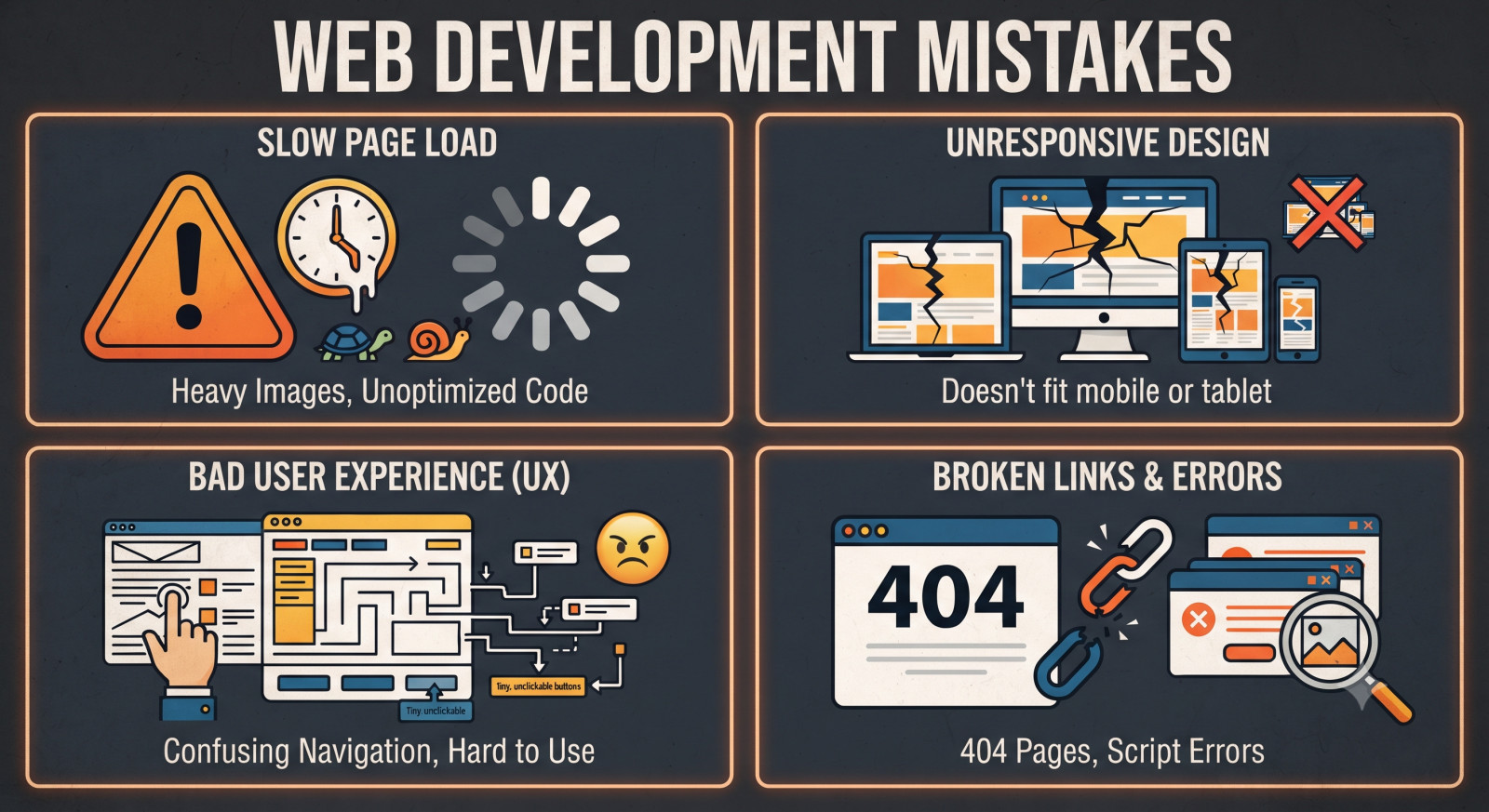
III. Common Technical Web Development Mistakes That Kill Performance
Mistake 1: Bloated Asset Management
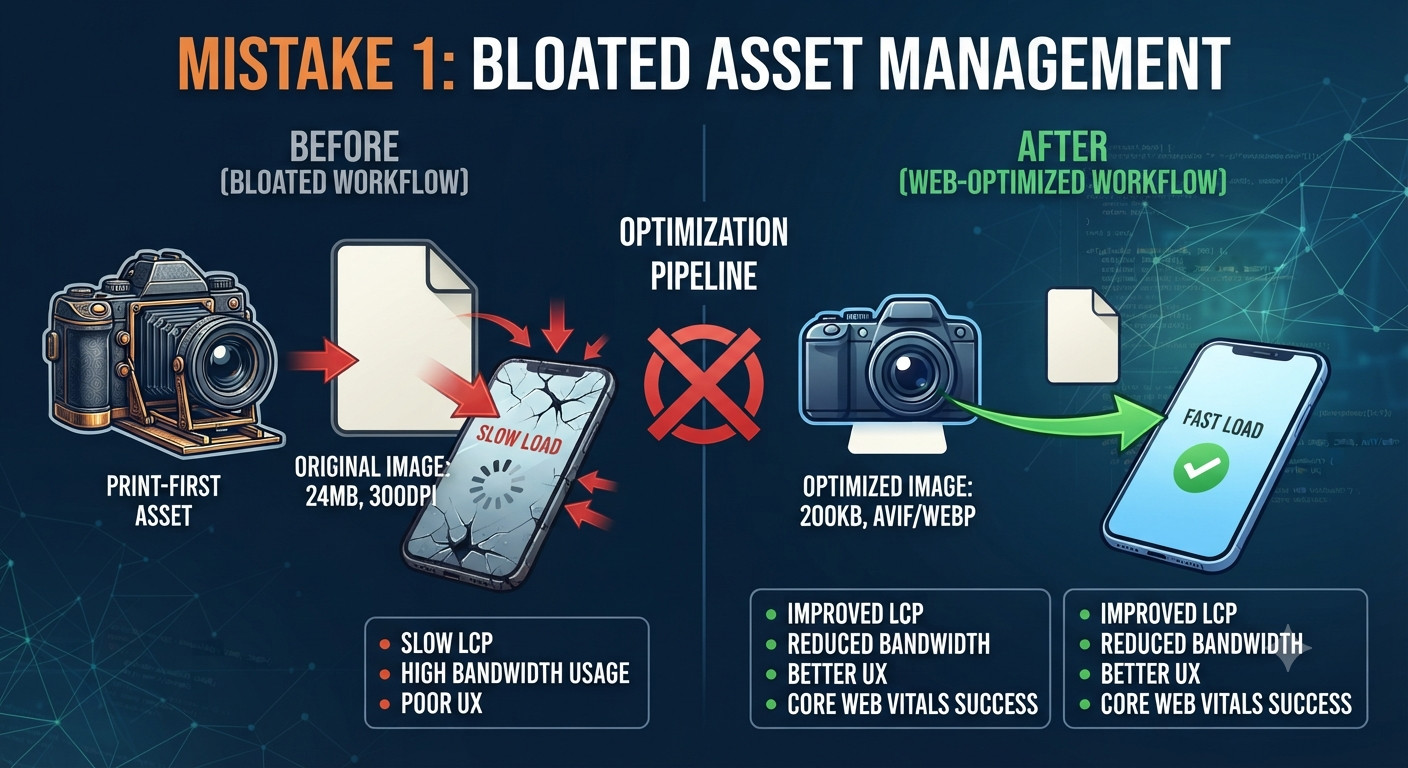
Your largest asset (literally) is probably the slowest part of your page. And yes, I’m referring to the graphics, images, and high-resolution photos on your pages. Often, the biggest graphics are the ones that were created for print before they were even brought to the web.
-
Uncompressed and legacy images: While high resolution images are used to make web pages look better, their huge page weight is most often the cause of slower loading web pages. Many developers use uncompressed JPEG images or PNG images, not realizing that there are better formats like WebP or AVIF that with the same quality have file sizes of 30-50% of the sizes of the other formats.
-
Delivery that is not responsive: When serving a high-resolution desktop image to mobile users, this is one of the largest web development mistakes a developer can make. Utilizing the size attributes of the tag allows for the developer to serve the optimal image for the user, based on the device’s viewport.
-
Lazy Loading: An important technique for performance to load items outside of view as the user is scrolling through the site first and then load the items that are in the view. The native lazy loading for images and iframes are supported by adding the attribute loading with value lazy to the corresponding HTML tags.
Mistake 2: Poor JavaScript Execution
JavaScript is probably the most interactive part of a web page but is also probably the most expensive resource for a browser to process. In our current Single Page Application (SPA) trap, many teams ship huge JavaScript bundles to the client which the user’s device then needs to download, parse and run – and most of that code is not even needed for the first user interaction.
-
The Burden of Third-Party Scripts: As mentioned earlier, things like analytics trackers, chat widgets and social media embeds can be extremely slow for page load. Every additional script equates to another network request for the browser, and the processing power required to run these scripts can also significantly impede performance. Tracking down these scripts and enabling them to load after the initial page load (after a user interaction for instance) can greatly aid in terms of initial latency.
-
Render-Blocking Scripts: Any scripts included on a web page using a <script> tag, whether or not they are required for functionality, have the ability to block rendering of a web page as they must be downloaded and then run by the processor before any part of the web page’s content (including a page’s <div>s) can be rendered by the browser. Use of the defer or async attributes on a <script> tag is sufficient to mark a script as non-critical and cause the browser to continue to render the web page in question (including construction of the document object model for the page) after the script in question has been told to begin to load (thus facilitating the important performance benefit of allowing HTML in a page to continue to be parsed and rendered as the page’s code is fetched from the overburdened server(s) one line at a time).
Mistake 3: Inefficient CSS and Layout Shifts
CSS is basically the visual layout of your website, but without care, it can become one of the biggest performance blockers. A classic and widespread problem is what we call the "monolithic stylesheet" problem. It's when there is one huge CSS file being used in every single page regardless of whether the components being styled are even present on the current view.
-
Remove Unused Code: In order to solve this issue, developers need to audit their CSS and get rid of dead code. Tools like PurgeCSS detect unused CSS selectors and get rid of them, thus leaving only relevant CSS.
-
CLS Suspect: Cumulative Layout Shift (CLS) continues to stealthily kill user experience scores.This will occur when the image, iframe, or other elements are loaded without predefined dimensions, meaning that the browser will not know how much space to leave for the elements. This causes “layout jump” once the elements are loaded. In order to avoid such an issue, it is important to specify width and height so as to reserve enough space from the user’s point of view.
-
Font Display Solution: Web fonts can play tricks on you. They could make your page display an invisible text or unstyled text because of the loading time. Setting up font-display: swap allows the browser to use system font immediately while still being able to swap fonts if it loads successfully. This way, content will always stay readable starting from the first millisecond.
Mistake 4: Server-Side and Network Neglect
A perfectly tuned front end can be hampered by a slow back end. If the time required by your server for processing before returning the first bit of data (TTFB) is 800 milliseconds, any optimization done on the client side will only marginally improve performance. Speedy response from the server is the foundation of performance.
-
Database Performance Issues: In the case of platforms that rely on artificial intelligence technology, poor database queries might be the problem. Poorly crafted queries result in significant latency because the server has to scan through millions of records. Make sure your database has proper indexing.
-
Utilize CDNs: The use of a CDN is highly important in offering scalable services on a global level. This is achievable through serving static files such as images, scripts, and stylesheets using a network of geographically spread out servers. It is preferable that the user who is accessing your website from Tokyo receives the file served from the nearest server nodes instead of waiting for the file to travel from North America via the Pacific Ocean.
-
Compression Must Be Enabled: Modern techniques of compressions, including Brotli and Gzip, are fundamental. These techniques have the ability to compress the text files such as HTML, CSS, and JavaScript by 70%. It is foolish not to have it enabled on the server side since this technique alone is a quick win in terms of performance improvement. No coding change is required to enable it.
IV. Architectural and Strategic Mistakes
Performance problems do not arise from a lack of technical skill, but rather from poor processes. Performance is not something you configure once and forget about—it is a practice that needs ongoing, cultural dedication from all members of the engineering team.
-
Designing for "Ideal" Environments: Programmers tend to write code in very good conditions, developing on powerful machines like the current MacBook Pro and using superfast fiber optic internet connections. This can be hazardous because of what I call the "performance bias." During development and testing, it can be difficult to realize that the 5MB hero image or JavaScript file has a negative effect on load times. But, remember, a good number of users are using mid-range smartphones or 4G networks. The programmer should develop a "slow network" mindset, which means using Chrome DevTools' ability to simulate bandwidth and CPU usage. When your application runs well at "Fast 3G," it runs fast everywhere else.
-
Not Considering Performance Budgets: The absence of boundaries will always result in a degradation of performance when new features come into the picture. "Performance Budget" can be described as something that puts on some guardrails. This means that there will be some limits set, for example, maximum size of an initial JavaScript bundle – 200 KB or maximum total weight of a page – 1MB. Developers understand that if a new feature has a certain budget, they should choose appropriate libraries and assets.
-
"One-Time Project" Misconception: The most critical error is that web performance is seen as something that is done post-launch of a project – a box which should be checked. Web performance is something that changes and degrades when new code is added and when new third-party scripts get added. You cannot improve your performance if you do not measure it.
-
Performance Culture and its Impact: If your organization wants to succeed, then the performance should be included in the CI/CD pipeline. With the help of automated tools, you will be able to conduct lighthouse audits on each pull request. As soon as the performance becomes a common metric and is measured by the design team, the developers, and the stakeholders, it stops being just some technical task. The performance becomes one of the key elements of your company’s brand. By creating a culture where performance is valued, you are developing a solid and professional product that beats all the competition with no extra effort. At the end of the day, you are building something for the user, and the best gift you can give them is good performance.
V. How to Audit and Monitor Performance
If it’s not measured, it’s not managed. In the case of web performance, auditing is not something that happens once but is an ongoing process of observation, analysis, and optimization. Without proper tooling, developers have no way to understand what's going on in their sites other than using gut instinct.
-
Tooling Required by the Modern Developer: To get a rough idea of your site's current status, there is always Google PageSpeed Insights. It offers a detailed report on Core Web Vitals and possible areas for improvement. I have not looked at your code yet, but to get a deeper view of your performance on various devices under different network conditions, use the Lighthouse tab in Chrome DevTools. There you can set up a variety of device and network profiles. WebPageTest on the other hand gives you a more abstract view of your site’s structure and dependencies.
-
Difference between Real User Monitoring and Synthetic Monitoring: There is a huge difference between testing your website within a controlled environment and seeing how it performs in the real world. In a way, synthetic monitoring, which includes tools like Lighthouse, is very ideal for development. This will help you get reproducible metrics about your web development application. Real User Monitoring (RUM) helps you collect user experience data from real people browsing your website from various environments, using different browsers, and using different devices. The use of only synthetic testing may give you the illusion of safety. It’s better to have RUM tools such as Core Web Vitals reports from Google Analytics..
-
Adding Performance to CI/CD: The best way to avoid performance degradation is to automate it. By incorporating performance budgets and lighthouse audits into your CI/CD process, you guarantee that there won’t be any bloated code and large assets on the live site. Set up the builds in such a way that in case a pull request results in a larger page size or a poor performance score, the build will fail. Once performance becomes an automatic gate keeper, the burden of dealing with it moves away from being a “fix it later” problem and turns into an everyday part of engineering.
Frequently Asked Questions (FAQ)
1. Why does the “magic number” refer to 3 seconds? Numerous studies show that users lose concentration in 3 seconds, which affects their bounce rate and conversion negatively.
2. Can there be anything else besides speed in SEO? Indeed, speed is a key metric. Google’s core web vitals assess loading time, interaction (INP), and visual stability (CLS) of pages.
3. What can I do easily to make my site faster now? Optimizing images and implementing Gzip/Brotli compressions via your server are “the lowest hanging fruit.”
4. How do the third-party scripts impact me? The chat widgets and other scripts usually block rendering. THey needs to be loaded through async or defer attributes.
5. Why does CLS happen? It happens due to the absence of image, dynamic advertisement, or font swap width and height. There should always be room for them.
6. Do I need to use CDN? Definitely, as it keeps your assets all around the world to cut down the physical distance (latency) between server and user.
7. How often should I check performance? It is an ongoing process. You should automate Lighthouse checks with each commit.
8. Is "mobile-first" only about screens? Not really. Being mobile-first is being mindful about performance. Your site must be light enough to run on unstable, slow, or throttled connections.
9. What is the Performance Budget? This is a set of restrictions (for instance, maximum 200KB for JS) that your team will stick to, no matter what, in order to maintain good performance despite a growing codebase.
10. Should I do RUM if I already have a Lighthouse? Yes. Lighthouse is your lab results ("synthetic"); RUM (Real User Monitoring) provides you with info on how real-life users from all over the globe feel about your website.
VI. Performance as a Competitive Advantage
In today’s digital environment, speed no longer remains merely a technical luxury. It is an essential pillar of user experience and an important aspect of your brand. As discussed in our course, a site built around the concept of performance is not merely a fast version of its previous incarnation; rather, it is a more dependable and trustworthy platform for conversions.
Performance is a philosophy, not a mere attribute. It stems from continuous architectural diligence, intelligent decision making, and a profound understanding of user empathy, particularly with respect to users who visit your website through weak network connections. With a performance philosophy in mind, you are doing much more than optimizing for search engines and latency reduction; you are fulfilling your promise of quality.
The advantage of a speedy site cannot be underestimated either. Whereas your competition continues to suffer from sluggish bundles and inefficient database queries, the fast site creates an image of your company by showing its appreciation of their time. Through instant replies and seamless interface, you will minimize friction, engender greater engagement and earn the trust required to turn curious clients into loyal partners.
Are you losing site visitors due to slow loading times or low core web vitals scores? Gigmint.ai can help. Our web development specialists will develop for you high-speed, safe and search engine optimized websites that enhance user experience and conversions. Get in touch with us today and find out how a fast website can boost your business growth.